How to register on Binance
Short answer
You need an email address or phone number and a password. On the website it takes five steps: enter your email or phone, agree to the terms, type the 6-digit code within 30 minutes, set a password of at least 8 characters with one capital letter and one number, then confirm the referral code field. Before you can trade, Binance requires identity verification, which its help page says is usually reviewed within 48 hours.

To register on Binance you need an email address or a phone number, a password, and a few minutes. The website sign-up has five steps and no ID check. Identity verification comes straight after, and Binance's registration guide says you must complete it before you can trade.
This page goes through it in the order you will meet it: whether you are allowed to sign up, which account type to pick, the website steps with screenshots, the Google, Apple and Telegram routes, the app, the referral code field, identity verification, and the first security settings. The steps follow Binance's English help pages, opened on 28 November 2026, and the two screenshots show Binance's English sign-up page in November 2026.
What you need and how long it takes
| You need | Why |
|---|---|
| An email address or a phone number you can receive messages on | Binance sends a 6-digit code to it |
| A new password | At least 8 characters, with at least one uppercase letter and one number |
| An ID document, for the step after sign-up | Passport, ID card or driving licence, depending on your country |
| A phone or laptop with a camera | The identity check includes a live face scan |
Creating the account is five screens. Verification is a separate set of steps, and the review that follows is "usually" within 48 hours, according to Binance's identity verification guide (updated 5 June 2026).
Can you register where you live?
Check this before anything else. Binance's List of Prohibited Countries, marked "Updated: 5 January 2026" and still the version on its official page on 28 November 2026, names nine places in three groups:
| Group | Places | Who is excluded |
|---|---|---|
| (i) | United States | Anyone located, incorporated or resident there, a US citizen, or operating there |
| (ii) | Canada, the Netherlands | Anyone located, incorporated or resident there |
| (iii) | Cuba, North Korea, Iran, Crimea, the so-called Donetsk People's Republic, the so-called Luhansk People's Republic | Anyone located, incorporated or resident there |
There are two different tests here. For the US, citizenship counts: a US citizen living abroad is still on the list. For the other eight places, what counts is where you are, where you live, or where a company is set up. Binance says in the same document that it may update the list without notice.
If you are in the United States: Binance.com does not serve you. Binance.US is a separate company, run by BAM Trading Services, with its own sign-up and its own rules. Our page on Binance vs Binance.US explains how the two are connected.
Binance's Terms of Use (version effective 5 January 2026) add more conditions:
- You must be at least 18, or the age of majority where you live if that is higher (clauses 2.1(b) and 32(q)).
- You must not have been suspended or removed from Binance before, and you must not be a "Restricted Person", which includes people on UN, EU or US sanctions lists (clauses 2.1(d), 2.1(e) and 41).
- You must not be in a place where using Binance is against the law, even if that place is not on the list (clause 2.1(f)).
- You must not get around the restrictions in any way, "including by use of any virtual private network" to change your IP address (clause 25.5).
The last two points matter more than the list for many readers. A country missing from the list does not settle whether the service is allowed where you live; that depends on local law. The full list with notes on each group is on Binance restricted countries.
 Coinyara's referral code
BTC6886
Sign up on Binance
Sign up with this code and get up to 20% of your trading fees back. The rate that applies is the one Binance shows you.
Binance's referral terms exclude users registered in EEA countries (since 1 July 2026), UK retail users, users based in Turkey, and residents of Hong Kong and Japan. If that is you, this code will not lower your fees. If you are in the United States, or a US citizen living abroad, Binance.com will not open an account for you; Binance.US is a separate company.
Coinyara is an independent site, not part of Binance. This is a referral link: if you sign up through it, Coinyara may receive a referral reward from Binance. Your sign-up steps stay the same.
Personal or entity account: you choose once
Binance has two account types. A personal account is for an individual. An entity account is for a company, signed up with a company email and the company's name, and it goes through entity verification instead of personal identity verification.
Binance's guide is blunt about this: "Once registered, you cannot change the account type." If you are opening an account for a business, use the entity route from the first screen. The steps below are for a personal account.
Signing up on the website: five steps
01
Open the sign-up page and enter your email or phone number
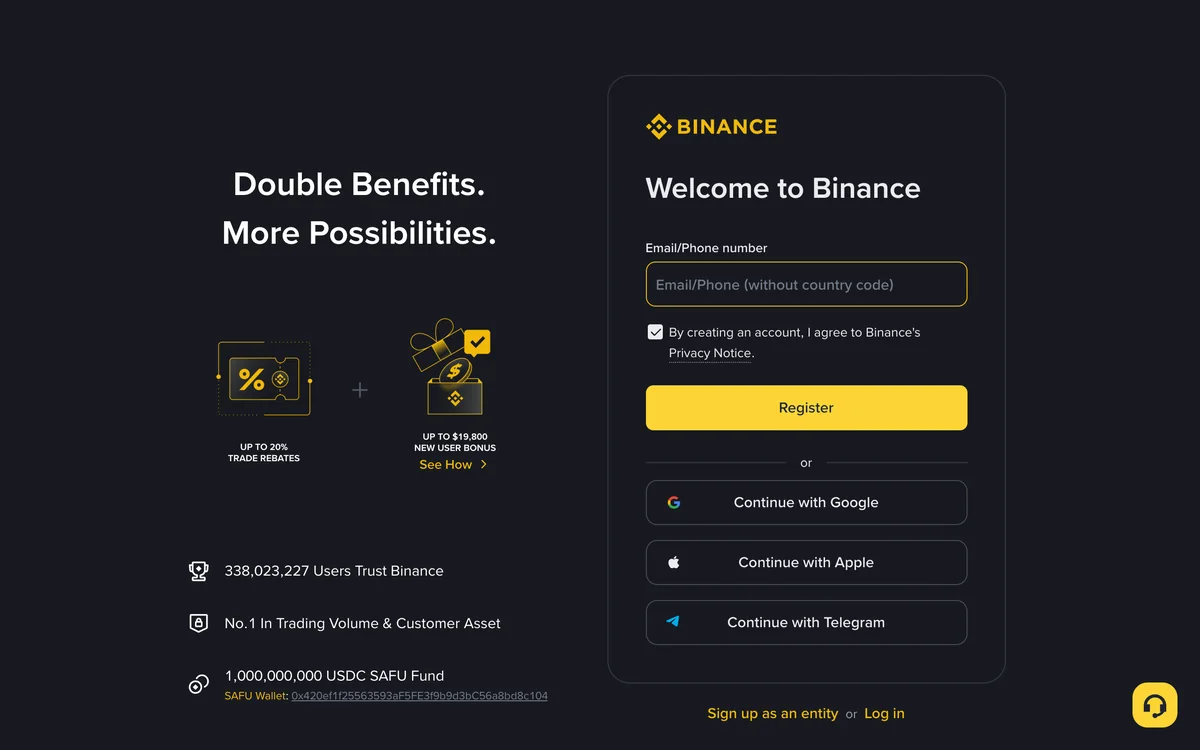
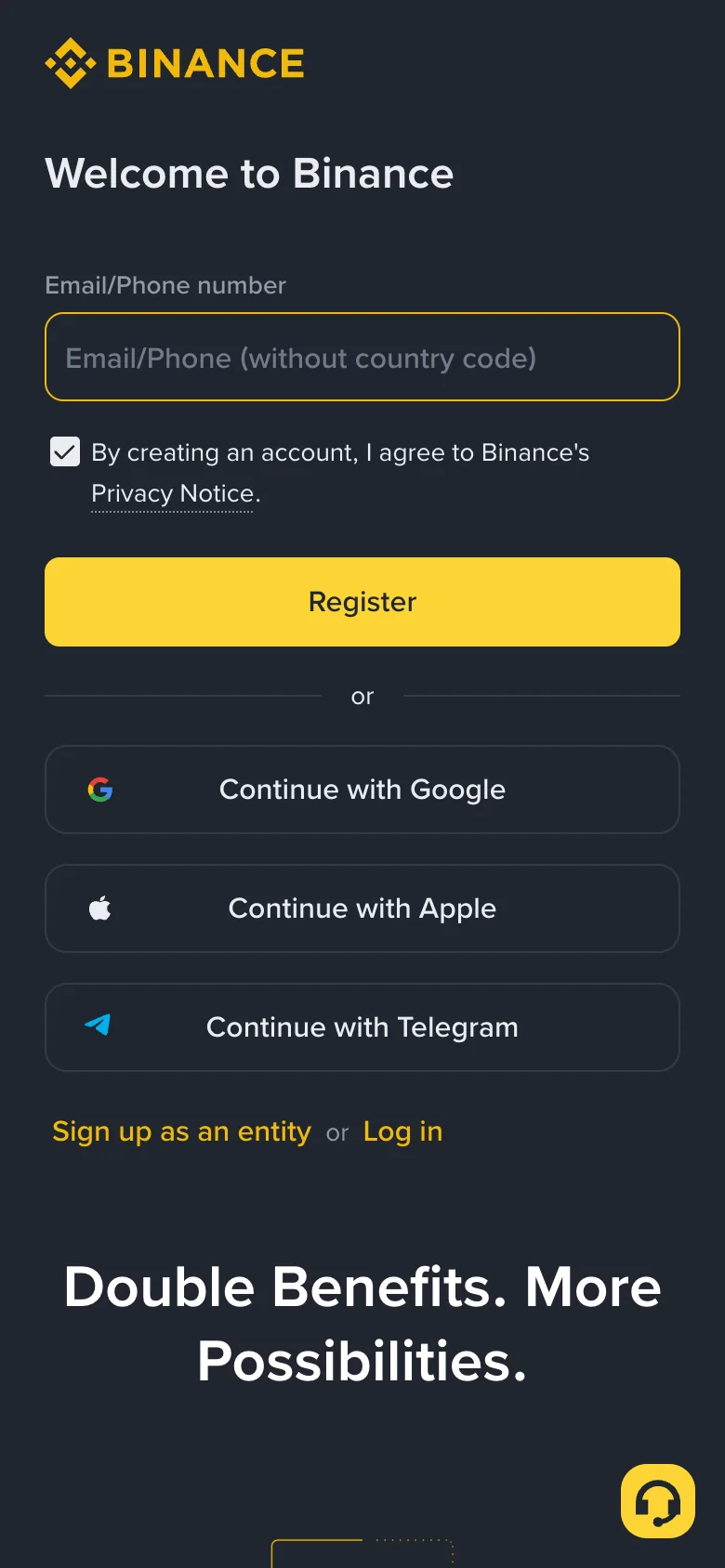
Go to binance.com. The sign-up page is headed Welcome to Binance. Type your email address or phone number in the Email/Phone number box. Below the button you will use in the next step are Continue with Google, Continue with Apple and Continue with Telegram, and at the bottom is Sign up as an entity or Log in, for companies and for people who already have an account.
02
Tick the box and click Register
Tick the box that reads By creating an account, I agree to Binance's Privacy Notice. and click [Register]. Look at the email or phone number again before you do: one wrong letter sends the code to someone else.
03
Enter the 6-digit code within 30 minutes
Binance sends a 6-digit code to your email or phone. The guide says: "Enter the code within 30 minutes and click [Submit]." If the 30 minutes run out, ask for a new code rather than typing the old one.
04
Create a password
The password must be "at least 8 characters, with at least one uppercase letter and one number." Then click [Next]. Binance's security tips page recommends a strong password you do not use on any other site.
05
Check the referral code field and finish
You will see a success screen with a referral code field. If you came through a referral link, the code is already there with a green tick and [Linked]. Click [Next] to finish. The guide adds: "Please note that you must complete identity verification before trading."
If the code does not arrive
Check your spam or promotions folder first. If texts do not come through, you can sign up with an email address instead; the steps are the same and the code goes to your inbox.
Google, Apple or Telegram instead of an email
You can also start with an account you already have. Binance's English guide describes each route.
Google or Apple. Click Continue with Google or Continue with Apple and sign in through the pop-up. Agree to the terms and click [Confirm]. When you are sent back to Binance, confirm you have read the terms and click [Next]. This route has no code to type and no separate Binance password to create in the steps Binance lists.
Telegram. This one has more back and forth:
- Click Continue with Telegram, then [Connect] in the pop-up.
- Log in to Telegram and tap [Confirm] on the notification Telegram sends you.
- Back on Binance, choose Create a new Binance Account. (The other option, Link an existing Binance Account, is for people who already have one.)
- Enter an email address or phone number, agree to the terms, and click [Next].
- Enter the code sent to you and click [Next]. The account is created, and you can add a referral code at this point if you have one.
Whichever route you take, identity verification is still required before trading.
Signing up in the Binance app
The app follows the same pattern. Here are the steps as Binance's app guide (updated 24 November 2025) gives them:
- Open the app and tap Sign up. The app has a Lite and a Pro mode; both have the button.
- Tap Create a Binance Account and pick email, phone number, Apple or Google.
- With email or phone: enter it, agree to the Terms of Service and Privacy Policy, tick the box and tap Next.
- Enter the 6-digit code within 30 minutes and tap Submit.
- Create a password with the same rules as the website and tap Next.
- On the success screen, check the referral code field, or tap Skip if you have none. Tap Next and the app takes you into identity verification.
Get the app through the download link on binance.com or from your phone's official app store, not from a link someone sends you in a message.
The referral code field
A referral code links your account to the person or site that invited you. Binance's referral FAQ says the inviter can choose to share part of their reward with you, which comes back to you as part of your trading fees. What you actually get is what Binance shows you at the time.
Three rules from Binance's own pages are worth knowing before you click Next:
- When it goes in. The code field appears on the success screen at the end of sign-up. A code from a referral link fills in by itself and shows [Linked]. In the app you can skip it.
- It cannot be changed. The registration guide says "once a referral code is linked to your account, it cannot be modified", and the referral FAQ says "once the referral relationship has been established, it cannot be changed or removed." If you do not want a particular code, start from binance.com yourself instead of from someone's link.
- Adding one later is narrow. The referral FAQ (updated 5 August 2026) lists conditions that must all be met: your verified identity has not been used on another account in the past 180 days, there is no existing referral relationship, it is a main (parent) account, you registered less than 30 days ago, there has been no deposit or trade, and the account is not flagged for wash trading.
Not everyone can take part. Binance's Referral Program Additional Notes (updated 22 September 2026) exclude users registered in EEA countries (since 1 July 2026), UK retail users, users based in Turkey, and residents of Hong Kong and Japan. On the UK, the page says "UK retail users cannot receive any incentive to trade." If any of these applies to you, a referral code will not lower your fees.
Identity verification
Verification is where you prove who you are. KYC, short for "know your customer", is the industry name for it. Our page Does Binance require KYC? covers what Binance's privacy pages say about the data; this section is only the steps.
Where it starts. On the website, hover over the profile icon, click Account, open Identification and click Get Verified. A Verify or Get verified banner on the homepage leads to the same place. In the app, tap Verify Now on the homepage, or open the account centre and tap Unverified.
The steps on the website, per Binance's guide updated 5 June 2026:
- Choose your country of residence, the country that issued your document, and the document type. Most users can choose a passport, ID card or driving licence; the options depend on the country.
- Upload from your device, or scan a QR code to carry on with your phone. Manual upload is not offered everywhere.
- Upload the document. For an ID card, that means the front and the back.
- Do the liveness check: allow camera access and follow the instructions on screen. The guide says not to wear a hat or glasses, not to use filters, and to make sure the light is good.
- Confirm your personal details. "You won't be able to change it once confirmed", so compare every field with your document first.
- Wait for the review. You get a notification when it is done.
Do not refresh the browser while you are doing this, or refresh or close the app if you are on your phone. Both are in the guide's list of things to avoid.
How long it takes. "Submitted documents are usually reviewed within 48 hours", the guide says, and it "may take longer in some particular cases".
If it fails. Binance's verification guide does not list rejection reasons. Go back over the points in step 4 (good light, no hat or glasses, no filters) and try again; if it still fails, contact Binance customer support through its help centre.
First security settings
Do these while the account is still empty. Binance's registration guide strongly recommends turning on at least one form of two-factor authentication (2FA), a second check on top of your password.
On the website, hover over [Profile], click [Account] and go to the Security page. In the app, Binance's anti-phishing guide says to tap your profile to open "Account Info", then select [Security].
Two-factor authentication. A passkey lets you approve logins with your phone's fingerprint or face unlock; Binance's passkey guide says it can be stored in iCloud Keychain, Google Password Manager, a security key or another device. An authenticator app, such as Google Authenticator, gives you a second code to enter alongside your password.
Anti-phishing code. This is a code of 6 to 8 characters that you choose. Binance's guide says it then appears in genuine Binance emails and SMS, so a message without it is not from Binance. It must use at least three of: uppercase letters, lowercase letters, digits and underscores.
A note on the October 2026 breach
Binance's hot wallets were broken into on 29 October 2026 (UTC). Withdrawals were paused on 30 October, reopened network by network from 1 November, and Binance said the suspension was fully lifted on 26 November (UTC). Its notice of that day adds that a small number of networks are paused for maintenance. Binance's final post-mortem had not been published as of 28 November 2026. The details are on Are Binance withdrawals open again?.
What comes after
Once verification is approved, the account can be used for buying and trading. This site stops at that point. Binance's own help centre has guides for buying crypto and for each deposit method in your country, and the options you see depend on where you live. If you want to check whether a particular coin is listed before you put money in, our coin lookup reads Binance's public list of trading pairs when you open it.
Quick answers
Is it free to register on Binance?
Binance’s web and app sign-up guides list no payment step: you give an email or phone number, a code and a password, then verify your identity. Fees come later, when you trade or withdraw. On 28 November 2026 Binance’s fee schedule showed 0.100% per spot trade for regular users.
Can I register on Binance without a referral code?
Yes. Binance’s app guide says you can skip the referral step if you have no code. Once a code is linked to your account it cannot be modified, and adding one after sign-up is only possible within 30 days of registering, before any deposit or trade, among other conditions.
Can I change a Binance personal account to a business account later?
No. Binance’s sign-up guides say that once you have registered, you cannot change the account type. A company needs to sign up for an entity account from the start.
Sources for this page
- Binance FAQ, How to Register on the Binance Website?page dated 2022-07-06, updated 2025-11-24 · opened 2026-11-28
- Binance FAQ, How to Complete Identity Verification for a Personal Account?page dated 2019-04-23, updated 2026-06-05 · opened 2026-11-28
- Binance FAQ, Binance Referral Program - Additional Notespage dated 2022-01-07, updated 2026-09-22 · opened 2026-11-28
- Binance FAQ, How to Register on the Binance App?page dated 2020-05-06, updated 2025-11-24 · opened 2026-11-28
- Binance FAQ, Referral (how referral relationships and adding a code after sign-up work)page dated 2021-04-19, updated 2026-08-05 · opened 2026-11-28
- Binance, List of Prohibited Countries (PDF, updated 5 January 2026)page dated 2026-01-05 · opened 2026-11-28
- Binance Terms of Use (PDF, effective 5 January 2026)page dated 2026-01-05 · opened 2026-11-28
- Binance FAQ, Anti-Phishing Codepage dated 2023-04-21, updated 2026-08-28 · opened 2026-11-28
- Binance FAQ, Binance Account Security Tipspage dated 2018-01-18 · opened 2026-11-28
- Binance, Fee scheduleopened 2026-11-28
- Binance announcement, Service Recovery Update: Withdrawals Recovery Work Complete (2026-11-26)page dated 2026-11-26 · opened 2026-11-28
Filed under
More in this section
-
Binance restricted countries: the nine places on its list
The nine places, the two different tests, the age and VPN rules in the terms, and where the live list is.
Checked